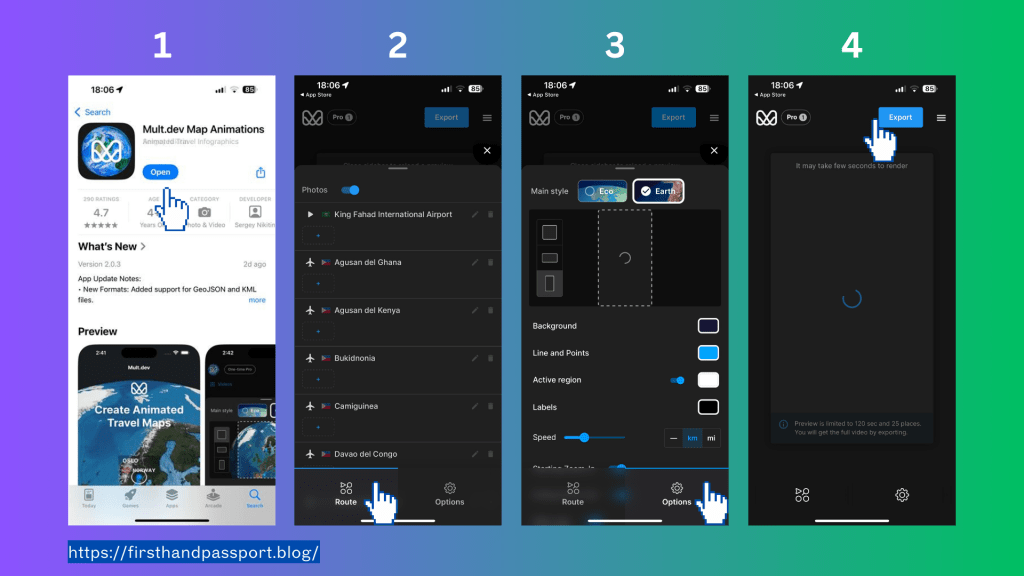
Traveling is an enriching experience, and capturing those moments can make them even more memorable. One fantastic way to visualize your travel adventures is by using the free app, Mult.Dev Map Animations. This app allows you to create stunning animated maps of your journeys, making it easier to share your experiences with friends and family. Here’s a step-by-step guide on how to get started:
- Download Mult.Dev Map Animations and Create an Account: Begin by downloading the Mult.Dev Map Animations app from your preferred app store. Once installed, create an account to access all the features.
- Set the Route by Clicking the “Route” Menu: After logging in, navigate to the “Route” menu. Here, you can set the path of your travel by inputting your destinations and waypoints.
- Click Options to Set Audio and Theme: Customize your map animation by selecting audio and themes that match the vibe of your journey. This feature allows you to add a personal touch to your travel visualization.
- Export and Enjoy: Once you’re satisfied with your animated map, export it to share on social media or keep as a digital memento of your travels.
Benefits
- Visualize Your Travel: The app helps you create a visual representation of your journey, making it easier to reminisce about the places you’ve visited and the routes you’ve taken.
- Perfect for Social Media Posts: Animated maps are a unique and engaging way to share your travel experiences on social media. They can capture the attention of your followers and make your posts stand out.
- Easy to Use: Mult.Dev Map Animations is user-friendly, making it accessible for everyone, regardless of their tech-savviness. The intuitive interface ensures that you can create beautiful animations with minimal effort.
Using Mult.Dev Map Animations, you can transform your travel memories into captivating visual stories that are easy to share and enjoy. Happy travels!
 firsthandpassport
Leave a comment