
- Staying Updated Online
- The Importance of Internet Connectivity
- My Preferred e-SIM: Holafly
- Conclusion
As a DIY traveler, one of the most essential tools in my arsenal is Google Maps. While it’s great to have internet access for real-time updates, did you know you can use Google Maps offline? Here’s how to download an offline map:
- Open Google Maps and click on Offline Maps.
- Select your own map and choose the location you want to download.
- Let it finish downloading, and you can use the map without internet.
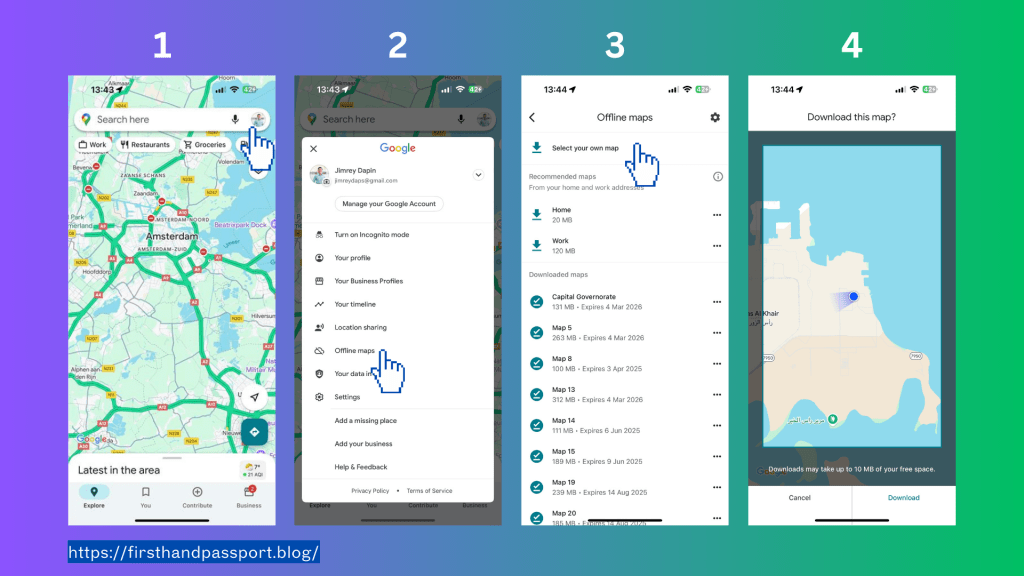
I recommend downloading the map a day before your travel to ensure the latest developments or updates are included.
Staying Updated Online
As a DIY traveler, I strive to make everything online and stay updated. Maps are more accurate when connected to the internet, especially if you’re using public transportation. In Europe, trains and buses are updated through Google Maps, including exact platforms and timetables.
The Importance of Internet Connectivity
Since I started DIY traveling, I’ve always used the internet to fit my personality. For me, staying connected is crucial, which is why I always use an e-SIM. You can buy an e-SIM or SIM card at the airport of every country or any kiosk. However, as a DIY traveler, I prefer to be prepared so that the moment I land at the airport, I’m connected right away to check the bus or train going to the city center.
My Preferred e-SIM: Holafly
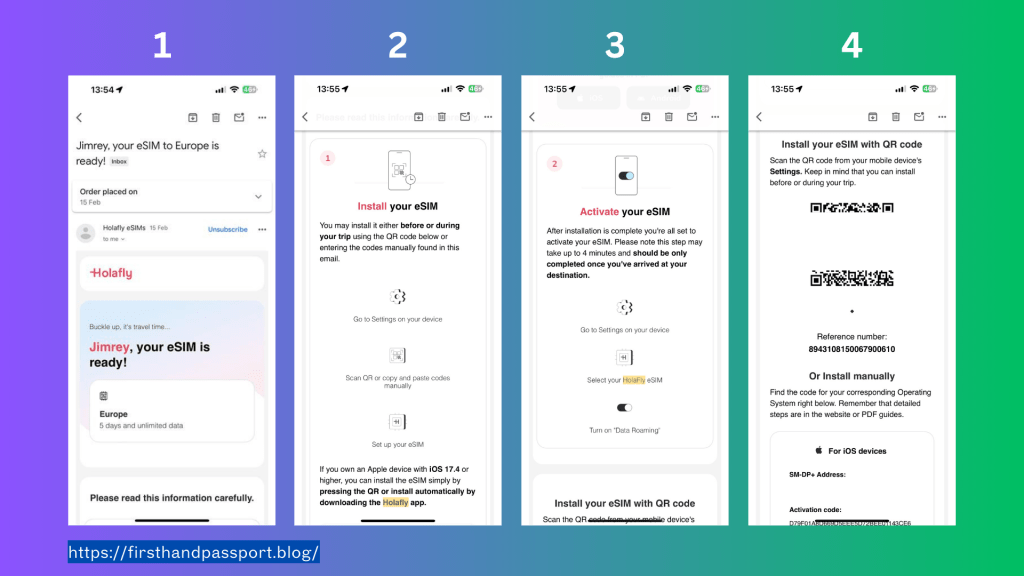
I’ve tried various e-SIMs, but Holafly stands out. This isn’t an ad or promotion; I genuinely appreciate its easy installation and unlimited internet. The data internet connection is really fast because it usually connects to the stronger and major internet providers. The price is reasonable considering it is unlimited data. For my 5 days of stay in Europe, I only spent €18.90 and I could even share it with my travel companion. Here are two options to install it:
QR Code
- Just scan the QR code.
Manually
- Go to your phone’s e-SIM settings.
- Copy the SM-DP+ Address and Activation Code. Make sure you have internet access, so install it a day before you travel.
- Turn it off and turn it on when you land in the country and activate data roaming.
Conclusion
DIY traveling is all about preparation and staying connected. By downloading offline maps and using a reliable e-SIM like Holafly, you can ensure a smooth and hassle-free travel experience. Happy travels! 🌍✈️
Feel free to share your own travel tips or ask any questions!
 firsthandpassport
Leave a comment